Personal • In progress 2026
Canopy
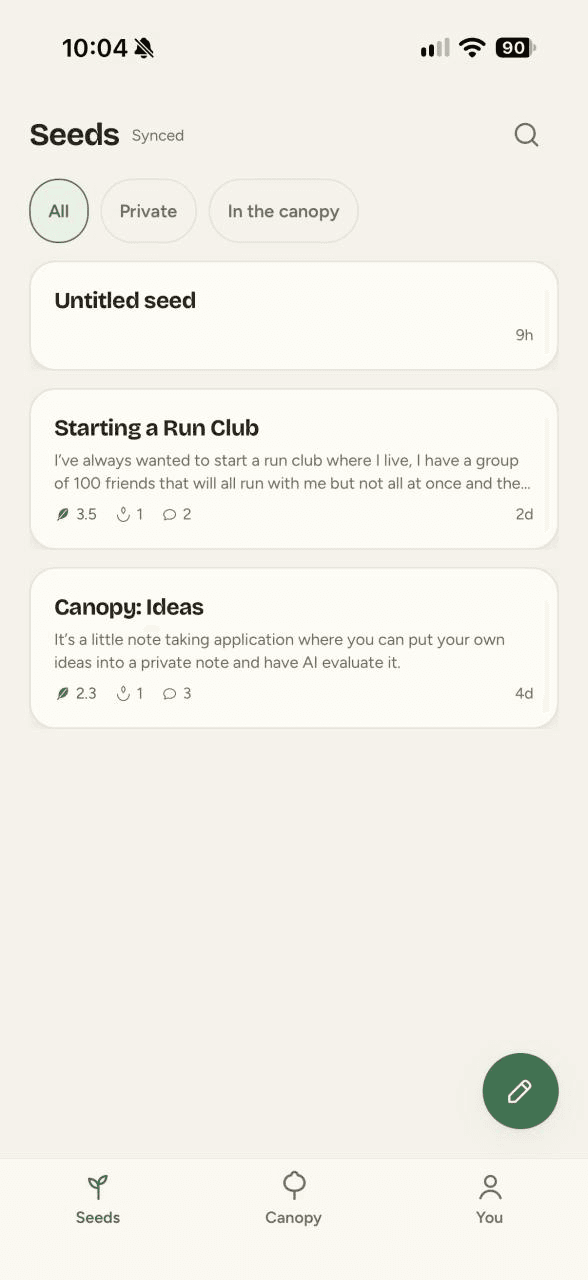
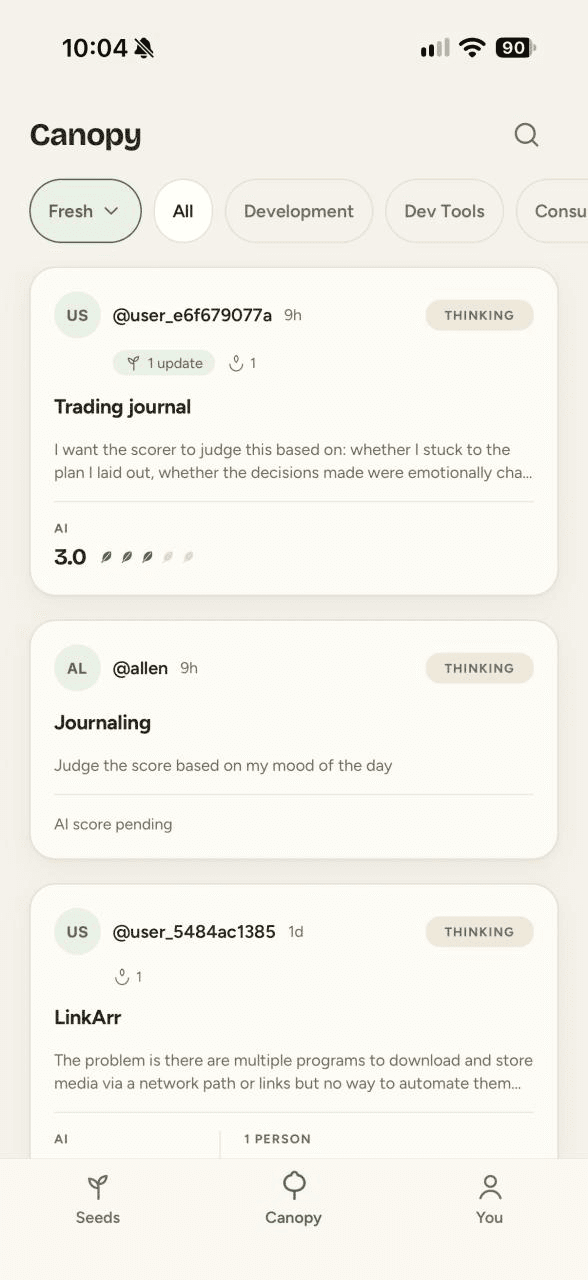
An iOS app for people with ideas. A local-first private notebook paired with a public board where an AI and other people score each idea side by side, and every released idea carries a verified outcome. Built solo in about a week, and it's on Apple's TestFlight right now.
- Role
- Designer and developer
- Timeline
- First commit Aug 28, 2026. On Apple's TestFlight right now.
- Team
- Solo
- Stack
- Expo, React Native, TypeScript, SQLite, Supabase, RevenueCat
Context
Canopy is an iOS app for people with ideas. You keep a private notebook of them on your phone. When you're ready you release one to a public board, where an AI and other people score it 1 to 5 on problem severity, market pull, feasibility, differentiation, and personal fit, side by side.
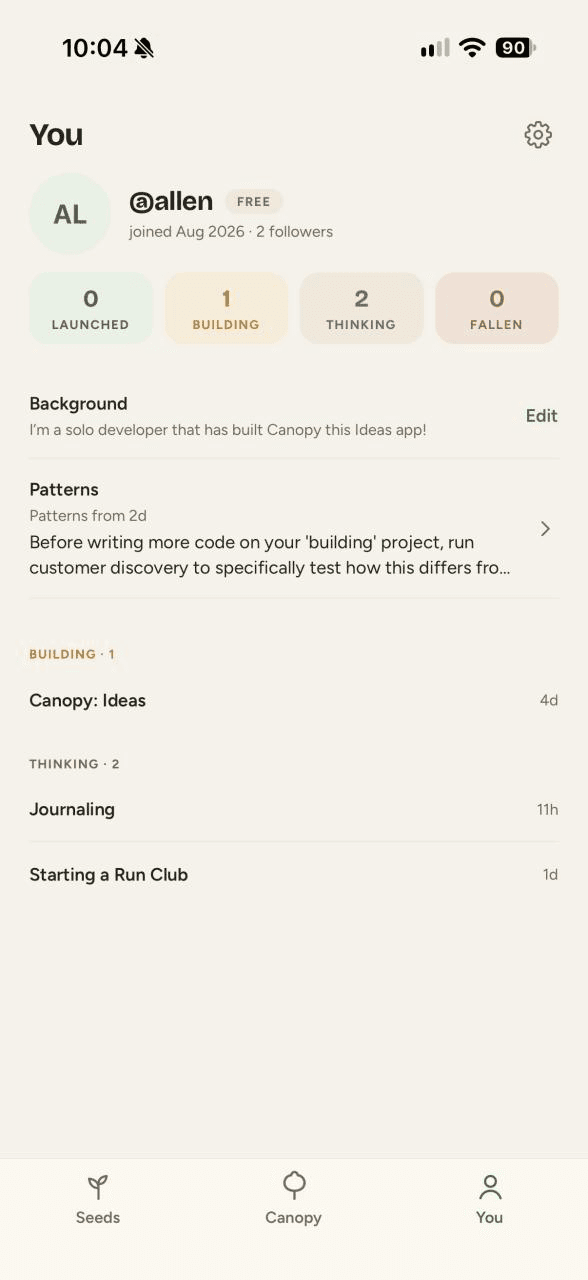
The fun part is seeing where the AI and real people disagree. Every idea you release also gets a status, thinking, building, launched, or fallen, and if you launch it you can prove it by linking the GitHub repo. Over time you build up a track record.
I built it solo in about a week. First commit was August 28, 2026, and it's at 246 commits. It's on Apple's TestFlight right now.
The website is at joincanopy.app.
Stack
- Expo SDK 57
- React Native
- expo-router
- TypeScript
- SQLite
- Supabase
- Postgres RLS
- Deno edge functions
- Gemini / Anthropic / OpenAI
- RevenueCat
- Sentry
- SvelteKit
Expo and React Native in TypeScript, with SQLite for the private ideas and Supabase for the public ones. The AI scoring can fail over between Gemini, Anthropic, and OpenAI, and RevenueCat handles the subscriptions.
What's built
Offline notebook. You can write, edit, delete, restore, and export ideas without an account. It works in airplane mode and survives a force-quit.
Sync. Ideas pull with a cursor and server-time watermarks so the app never misses an edit that landed while it was offline. Last write wins, and when two edits really collide it keeps a conflicted copy instead of throwing one away. Anything you wrote anonymously comes with you when you first sign in.
Auth. Sign in with Apple, Google, or an email code. You can also start anonymous and link a real account later.
AI scoring. One router sits in front of Gemini, Anthropic, and OpenAI so an outage at one provider doesn't take scoring down. It rotates keys, retries with jitter, and retries again when a response doesn't match the schema. The rubric is calibrated and the prompts are hardened against injection. Each score takes a credit atomically and gives it back if the call fails. There's a red-team test suite and a circuit breaker with daily caps so a bug can't run up the bill.
The board. You release ideas into groves. The feed has 5 sorts and no algorithm: Fresh, Rising, Most Disputed, Launched, and Following. You can't score anyone else's idea until you've released one of your own. There's full-text search, catching, threaded comments with likes, follows, growth updates on a timeline, and push notifications that deep link into the app.
Track record. Every status change is timestamped. Linking a repo goes through GitHub OAuth so the app can check you actually own it. The verified stamp is only ever set on the server, and the tokens stay in Supabase Vault.
Trust and safety. Moderation runs before anything goes public, with crisis routing. If the check can't run the idea stays private. There's a report queue, takedowns and bans, blocks enforced in the database with RLS, rate limits, an EULA, incognito, and account deletion in the app that tombstones your public content.
Heartwood, the paid tier. Subscriptions go through RevenueCat and entitlements come from its webhooks, including transfers. Paid features are Rings, Patterns, Catchers, disagreement alerts, and score history. Rings are web-grounded deep dives on one idea, Patterns is analytics over your scoring history, and Catchers shows who saved your leaf. Rings and Patterns spend the same credits as scoring.
Anti-abuse. Apple App Attest with challenges issued by the server, and per-device quotas that stick around after you delete your account so you can't reset them by starting over.
Web. The website is SvelteKit. Leaf pages are server-rendered with Open Graph comparison cards so a shared link shows the scores before you open it, and universal links open them in the app. There's a privacy page called Your seeds are yours, and you can share a scorecard image from the app.
First run. 3-pane onboarding, an example scorecard in the empty state, and a way to tell it when you disagree with a score. Review prompts only fire after something real happens. Markdown and JSON export, Dynamic Type and Bold Text, and light, dark, and tinted iOS 18 icons.
Testing. Vitest unit tests, an RLS suite with 67 checks, sync and pipeline integration tests, and the AI red-team suite.
Decisions
- Private ideas live in SQLite on the phone and only released ones go to Supabase, so the notebook works with no account and in airplane mode.
- Sync is last write wins. When two edits really collide it keeps a conflicted copy instead of throwing one away.
- One router sits in front of Gemini, Anthropic, and OpenAI instead of betting on one provider, so an outage doesn't take scoring down. Each score takes a credit atomically and gives it back if the call fails.
- Moderation fails closed. If the check can't run, the idea stays private.
- The verified stamp is only ever set on the server and the GitHub tokens stay in Supabase Vault, so the app can't grant it to itself.
- Per-device quotas outlive the account, so deleting it and starting over doesn't reset them.
What's next
Getting it on the App Store and Google Play, and getting my CRA business account set up on the Apple side.